









Access to knowledge and scientific research is no longer limited to university libraries or print journals as it was in the past, but is now available to everyone thanks to digital tools that have radically changed the way academic research is conducted.
In an era where the amount of information increases day by day, researchers need smart tools that can directly lead them to reliable sources without wasting time on manual searching.
This is where Google Scholar comes in, also known as Google Scholar, which is considered one of the strongest free academic platforms in the world. It provides an effective and fast way to access millions of studies, scientific articles, and theses from various disciplines.
Having the skill to use Google Scholar professionally gives the student or academic researcher a real competitive advantage, as it enables them to track the latest research in their field, view citation counts, and discover prominent authors and research institutions related to their topic.
What Is Google Scholar
Google Scholar is a specialized search engine for scientific and research content, launched by Google in 2004 to be a platform that combines ease of use with accuracy in accessing information.
Unlike the regular Google search engine, which shows general results from the internet, Google Scholar focuses only on peer-reviewed research, academic articles, scientific books, and conference papers.
Google Scholar allows users to search through millions of published studies from trusted scientific journals, academic publishers, universities, and digital repositories.
It also displays detailed information in the search results:
-
Author names
-
Their affiliated research institution
-
Publication year
-
And the number of times the article has been cited
This last feature (citation count) gives researchers an important indicator of the strength and scientific spread of the study.
Google Scholar is considered an ideal tool for students, academics, and research supervisors, as it provides a large and diverse database covering various disciplines from medicine and engineering to humanities and social sciences.
How to Access Google Scholar and Create an Account
Using Google Scholar is very simple and only requires having a regular Google account (Gmail). You can access the platform directly through the link:scholar.google.com.
After logging in, users can create a personal researcher profile by clicking on the “My Profile” option at the top of the page.
The personal profile allows academic researchers to:
-
Add their personal and institutional information (university, specialty, academic email).
-
Automatically link their published research to their names.
-
Track the number of citations their research has received.
-
Making their profile public to increase academic visibility.
Users can also customize their profile by adding research interests such as “e-learning”, “civil engineering”, or “artificial intelligence”, so the system periodically suggests new articles and studies in the same field.
Creating a personal account on Google Scholar is not limited to academics only, but is also recommended for graduate students and independent researchers who want to build a reliable research record that is easily accessible online.
How to Search for Studies and Research Within Google Scholar
Searching within Google Scholar is an easy and efficient experience at the same time, as the platform was designed to resemble the interface of the regular Google search engine in terms of simplicity, but it differs in terms of the nature of scientific results it provides.
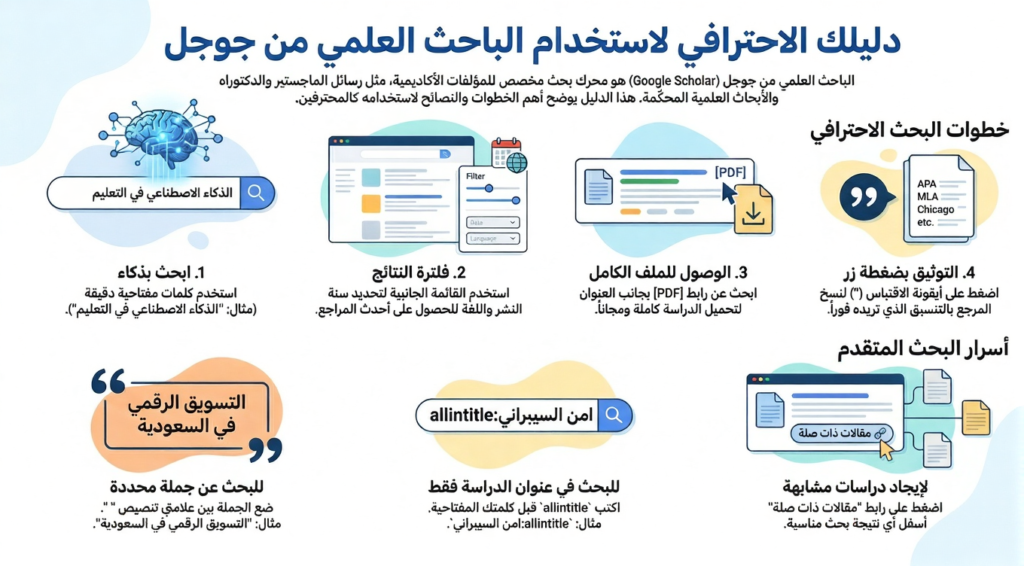
All the user needs to do is enter the keywords related to the research topic in the main search bar, such as: “distance education in Arab universities” or “artificial intelligence in medicine”. After pressing the search button, a list of results will appear containing academic studies published in scientific journals, conferences, or digital books.
Each search within the results shows a set of basic information that helps evaluate it before reading, including:
-
Title: This is the main link to the study or scientific article.
-
Author names and their affiliated research institution.
-
Publication year and place (journal, conference, book).
-
Number of citations (Cited by), which indicates the extent to which other researchers rely on this study.
Results can also be filtered using the sidebar to specify a specific time period, such as research published in the last five years, or choosing to display “Recent studies only”.
If some studies are available for free, the phrase [PDF] will appear next to them, which allows direct download of the file.
These features make Google Scholar an ideal tool for finding precise studies in any academic field without the hassle of navigating between multiple sites.
Using Advanced Search in Google Scholar
In addition to traditional search, Google Scholar offers a powerful tool called Advanced Search, which helps users get more accurate and relevant results for their research topic.
This tool can be accessed by pressing the sidebar menu icon (☰) and then selecting “Advanced Search”. After that, an interface appears with a set of fields that allow customizing the search process.
Among the most important options provided by Advanced Search:
-
Search for a specific phrase: You can enter a search phrase between quotation marks (“…”) to find studies that contain exactly the same phrase.
-
Search for studies by a specific author: Through the “Author” field, you can specify the researcher’s name to display all their published works.
-
Specify a time period: such as displaying research only between 2018 and 2025.
-
Restrict search by location or language: You can choose studies written in Arabic or English, as needed.
This advanced option helps avoid the large number of general results, and enables the researcher to reach specific sources accurately, especially when preparing master’s theses or in-depth academic studies.
An important tip: When writing a long topic or academic research, it is best to try several forms of keywords and compare the results, because Google Scholar relies on intelligent text matching and sometimes shows indirectly related but very useful studies.
How to Save Articles and References in the Personal Library
One of the useful features in Google Scholar is the ability to create a personal library (My Library), used to save articles and studies that a researcher finds important to return to later.
To save any study, it is enough to click on the star symbol ☆ located below the research title, which will be directly added to the library. It can be accessed by clicking on the “My Library” option in the sidebar of the homepage.
The library allows users to organize articles in custom folders such as “Doctoral Research”, “E-Learning References”, or “Research Methodology Articles”. It is also possible to filter saved materials later by date or author.
An additional feature is that the personal library is automatically saved within the user’s Google account, which means it can be accessed from any device (computer, phone, or tablet).
This makes reference management easier and more effective, especially for those working on long-term research projects who need to collect a large number of studies in an organized manner.
Setting up Search Alerts to Follow the Latest Studies
One of the most important features offered by Google Scholar is the research alerts feature, which enables the researcher to automatically follow the latest studies or articles published in their field.
Instead of searching manually each time, the system can send to your email notifications containing links to new research matching your keywords.
To create a new alert, you can follow these steps:
-
Type in the search bar the word or phrase you want to track, such as “Artificial Intelligence in Education”.
-
After the results appear, click on the “Create alert” option located on the left side of the page.
-
You will be asked to enter your email address and confirm the alert setup.
-
Once saved, you will start receiving messages containing the latest studies published on the same topic.
You can also modify or delete alerts through your account’s control panel.
This tool is very useful for researchers working on long-term projects or academic theses that require continuous monitoring of recent scientific developments.
Using the Academic Citations Feature
The Academic Citations feature is one of the tools that most facilitates researchers’ work in preparing references according to known academic styles such as APA, MLA, Chicago and others.
When displaying any study in the search results, you will notice below it an option called “Cite” or “Citation”. When you click on it, a window appears with multiple citation styles. You can copy the appropriate format directly and paste it into the references list in your research paper or academic paper.
For example:
-
According to APA style:
Ahmed, S. (2023). Artificial intelligence in education.Journal of Digital Learning. -
According to MLA style:
Ahmed, Sami. “Artificial Intelligence in Education.”Journal of Digital Learning,2023.
Google Scholar also allows for direct export of these citations to academic reference management programs such as Zotero, Mendeley, or EndNote.
This feature saves researchers a significant amount of time, especially when dealing with dozens of references in long studies.
Practical Tips for New Researchers on Using Google Scholar
Despite the ease of using Google Scholar, there are some smart practices that can make the research process more efficient and accurate.
-
Use precise and specific keywords:
Don’t type long sentences in the search bar; instead, use clear terms like “blended learning” instead of “modern teaching methods in universities”. -
Use quotation marks (” “):
When searching for a specific phrase like “distance learning”, place it in quotation marks to show results that contain this exact phrase. -
Check the citation count:
Research papers with a high number of citations are often more reliable and influential in the academic field. -
Read the abstract before downloading:
Don’t waste time downloading all files; just read the abstract to determine how relevant the study is to your topic. -
Integrate Google Scholar with other tools:
You can integrate Google Scholar with other platforms like ResearchGate or Academia.edu to expand your database and get more comprehensive results.
By following these tips, any student or academic researcher can improve the quality of their research and save a lot of time during the process of collecting and analyzing references.
Common Mistakes to Avoid When Using Google Scholar
Although Google Scholar is a powerful and easy-to-use tool, many researchers make a set of mistakes that reduce the quality of their search results or lead to the use of inaccurate sources.
Among the most prominent of these mistakes:
-
Relying only on the first result:
A study appearing first doesn’t always mean it’s the best; it might be outdated or unsuitable for your topic. It’s better to review multiple sources before relying on one. -
Ignoring the publication year:
In some fields, such as medicine or technology, information changes quickly. Therefore, it’s recommended to filter results to include only recent years, such as the last five years. -
Relying solely on Google Scholar:
Despite its power, it doesn’t cover all international academic journals. Therefore, it’s better to support your search with other programs like Scopus, Web of Science, or PubMed. -
Forgetting to save references in an organized way:
It is important to save important articles in your personal Google Scholar library or export them to a reference management software to avoid losing them later. -
Neglecting to verify the author’s or journal’s credibility:
Not everything published online is considered peer-reviewed research. One must ensure that the study is published in a trusted scientific journal or has been reviewed by specialists.
Pros and Cons of Google Scholar
Like any digital tool, Google Scholar has several advantages that have made it the first choice for millions of researchers, but it is not without some shortcomings.
Advantages:
-
Completely free: Anyone can use it without a paid subscription or registration.
-
Ease of use: Its simple interface makes it suitable for both beginners and professionals.
-
Wide coverage: It contains millions of research papers from various fields and languages.
-
Ability to create an academic profile: Helps researchers showcase their work and increase their academic visibility.
-
Citations and alerts feature: Facilitates the documentation process and tracking of the latest research in the field.
Disadvantages:
-
Lack of full control over result quality: Sometimes unreviewed or duplicate studies appear.
-
Absence of advanced filters compared to specialized academic databases.
-
Failure to cover some major scientific journals with closed subscriptions.
Overall, Google Scholar is a great tool to start with for scientific research, but it cannot replace the need for other academic sources when highly precise or continuously updated studies are required.
The Digital Future of Academic Research and the Importance of Google Scholar
With the rapid advancement in artificial intelligence and data analysis, the future of academic research is heading toward complete digitization.
Researchers no longer need to visit large libraries or browse through hundreds of books; they can access the latest studies published worldwide within minutes.
Google is expected to develop new tools within Google Scholar, such as:
-
Automatically suggesting the most relevant research based on artificial intelligence.
-
Analyzing research trends in each field.
-
Support for additional languages and enhancing the Arabic user experience.
All these developments will make Google Scholar a central part of modern research systems and an indispensable tool for any academic or graduate student.
Summary
Google Scholar represents a revolution in the world of scientific research, combining ease of use with powerful content to give researchers and students access to a vast amount of reliable academic studies and references.
By learning how to use it intelligently — from advanced search to citations — any researcher can significantly improve the quality and accuracy of their research.
If you haven’t tried Google Scholar yet, start today and discover the power of accessing academic knowledge from its source.
Start now through the official link:
https://scholar.google.com
Frequently Asked Questions (faqs)
1. Can Google Scholar be used without a Google account?
Yes, you can search and read results without logging in, but you cannot save articles or create a profile without a Google account.
2. Are all research papers in Google Scholar free?
Not necessarily. Some research papers are available for free in PDF format, while others require access through a university subscription or paid access.
3. How can I add my research to Google Scholar?
After creating your researcher profile, the system can automatically recognize your published research and link it to your name, or you can add it manually.
4. What is the difference between Google Scholar and PubMed?
PubMed specializes only in medical and biological research, while Google Scholar covers almost all academic fields.
5. Can references be exported from Google Scholar to Zotero or Mendeley?
Yes, references can be easily exported through the “Cite” option and then selecting the desired program, making it easier to organize references in research projects.

























