


Article Index
The world has witnessed a major revolution in digital education in recent years, where education is no longer limited to traditional classrooms or physical presence in schools or universities. Technology has become an integral part of the educational process, providing students and teachers with new opportunities to interact and communicate in a more flexible and effective way.
With this shift, many educational platforms have emerged aimed at facilitating the electronic management of classrooms, with the most prominent beingGoogleClassroom (Google Classroom), a platform that has brought about a qualitative leap in teaching and learning in the digital world.
What Is Google Classroom?
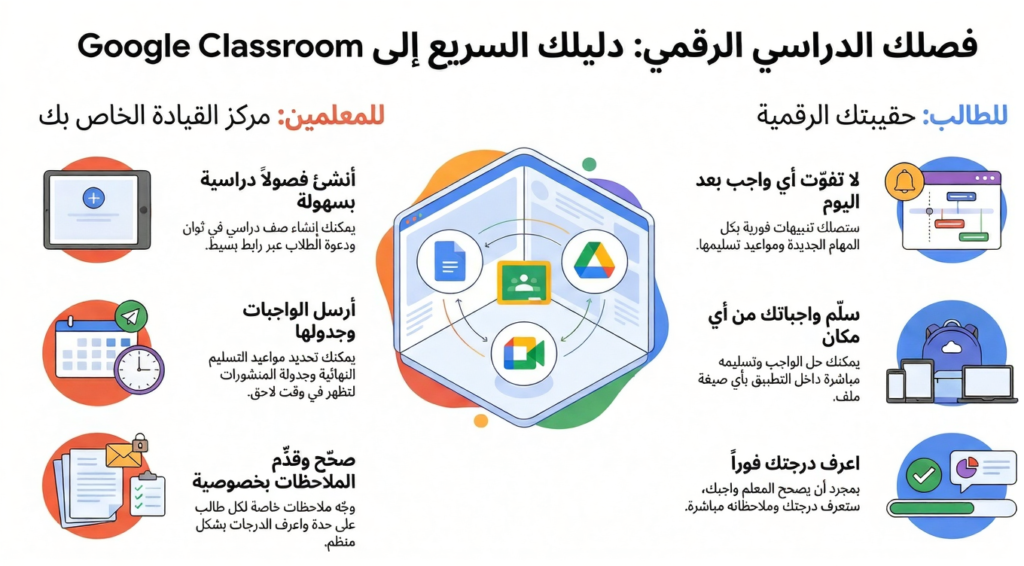
Google Classroom is anelectronic classroom management systemdeveloped by Google to enable teachers and students to create an interactive educational environment online. The platform allows teachers to create classes, assign tasks, track assignments, and conduct assessments easily, while students can join classes, complete their tasks, and share their work without needing traditional papers or files.
The platform is completely free, and any educational institution or individual user with a Google account can benefit from it, with the possibility of upgrading the experience through theGoogle Workspace for Educationservice, which provides additional tools for academic institutions.
Educational Objectives of Google Classroom
The platform aims to make education easier and more organized. It helps teachers manage classrooms efficiently and provides a safe and integrated digital environment for students to interact and participate. It also aims to enhance communication among all parties in the educational process—teacher, student, and parent—in one simple and easy-to-use place.
The Difference Between the Free and Paid Versions (workspace for Education)
Google Classroom is available in two basic versions:
-
The free version:Allows creating classes, assigning tasks, and assessing students using basic Google tools.
-
The paid version (Google Workspace for Education):Offers advanced features such as attendance monitoring, creating smart tests, greater user management, and special technical support for institutions.
This division makes the platform suitable for everyone, whether for personal use or academic use on a large scale.
How Google Classroom Works for Teachers
Google Classroom provides teachers with a wide range of tools that help them manage their classes effectively and organize all educational elements in one place.
Creating Virtual Classes
Teachers can create a new electronic class in minutes through their Google account. After creating the class, they get aunique codethat can be shared with students for easy joining. Teachers can also invite students directly via email. Classroom allows customizing the class name, description, and subjects in a simple way.
Managing Tasks and Educational Materials
Through the dashboard, teachers can easily add lessons, educational materials, videos, and links. They can also set a due date for each task and attach files from Google Drive or from the computer. These tools save significant time and effort compared to traditional methods.
Tracking Performance and Assessing Students
Google Classroom gives teachers the ability toassess assignments individually, with the possibility of providing customized feedback for each student. They can also track the overall progress of the class through performance reports, helping to identify the strengths and weaknesses of each learner.
Communicating With Students and Parents
The system provides an interactive environment that allows teachers to communicate with students through public posts or private messages. They can also send notifications to parents to follow up on their children’s learning progress. This feature enhances the spirit of cooperation among all parties and facilitates the follow-up process.